GeoCat Bridge 2.0.0
Details
| Release Date | October 30, 2026 |
|---|---|
| Minimum ArcGIS Pro Version | 3.3.x |
| Minimum .NET Version | .NET Core 8.0 |
| Configuration Model Version | 1.8 |
This is a major upgrade that introduces the Catalog Search panel, which allows you to
connect Bridge to a spatial data catalog (GeoNetwork, CSW, or OGC API - Records) and search for
interesting datasets or map services to add to your map.
You can use text queries, filters and sorting to refine the search results.
Besides this new feature, it also adds enhanced publishing and data management options, including:
- The ability to create new GeoServer layer groups from scratch.
- Assigning already published GeoServer layers to existing layer groups.
- Removal options for GeoServer layers, styles, and layer groups.
- Drag-and-drop layer publishing to active GeoServer workspace.
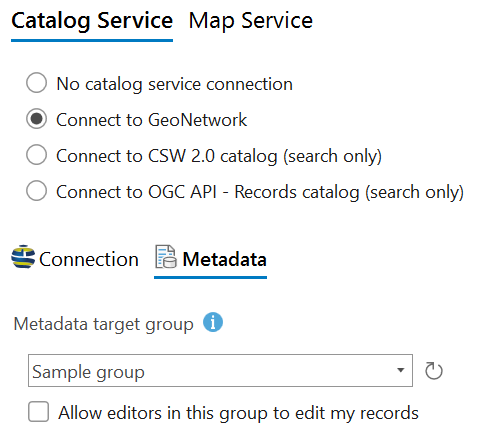
- Assigning metadata records to a GeoNetwork user group and allowing group editing.
Configuration review required
Record publishing to GeoNetwork now requires a target group (owner). This means that users or administrators will have to
update their Data Space configurations (under Catalog Service Metadata tab(1)).
Bridge automatically fetches the groups that the logged-in user belongs to, so you can select the group that applies.
An important behavioral change is that layer groups can no longer be published when publishing individual layers.
Instead, users should now publish the layers first and then create and populate the layer groups manually in the workspace view.
However, when publishing the entire map (Publish Map button), this will still create all layer groups automatically.
Finally, this release also adds functionality to check for new GeoCat Bridge software updates
whenever they become available (provided that internet connectivity is available). This check is
performed each time the About tab of Bridge is shown. If the user has switched on automatic software
update checks for ArcGIS, Bridge will also show a notification at startup.
Changelog
| Change Description | Ticket Reference(s)1 |
|---|---|
| Apply official Bridge icon instead of GeoCat icon | |
| UX/GeoNetwork: Add mandatory owner group to configuration, use for publication | |
UX/GeoNetwork: Remove MetadataGroupLayers option |
|
| Add Bridge software update check (About section, optional notification) | |
| Add catalog service connection options for CSW and OGC API - Records (search only) | |
| UX: Add Search tab to Data Spaces panel with catalog search UI (filters, sort options) | |
| Add search functionality for GeoNetwork (ES), CSW and OGC API - Records | |
| Add download options for supported WFS/WCS file formats | |
| Add options to add layers to the map from supported OGC services (WMS, WMTS, WFS, etc.) | |
| Add option to browse a supported OGC service (quick-add to ArcGIS Catalog) | |
| UX: Publish map or layer(s) from TOC context menu or via drag-and-drop | |
UX/GeoServer: Layer groups are only created automatically in Publish Map mode |
|
| UX/GeoServer: Layer group creation option in workspace context menu | |
| UX/GeoServer: Layer, layer group and style removal options in workspace context menu | |
| UX/GeoServer: Assign layer to layer group in workspace context menu | |
| Fix: Workspace settings restoration to skip GeoServer defaults | #5783 |
| Fix: Ephemeral port exhaustion from per-layer Postgres connections | #5748 |
SLD: Adjust se:Graphic element order to match OGC SE 1.1.0 schema |
#5830 |
| Regression: Fix metadata linkage in GeoServer layers (encoding, normalize identifier) |
-
Ticket numbers refer to issues that have been reported by GeoCat customers. These issues are not publicly visible. ↩