Installing Java
GeoCat Find requires a Java 11 environment in order to run.
Warning
Do not install a more recent Java version (Java 17, 21, ...). GeoCat Find has been compiled to work only with Java 11.
OpenJDK is now the lead project for the Java ecosystem, with a range of distributions providing downloads available for use.
We recommend using your operating system package manager to install OpenJDK Java 11. We recommend the OpenJDK provided the Temurin OpenJDK distribution for windows users.
Reference:
If you are running Windows, follow these steps to install the Temurin OpenJDK distribution:
-
Navigate to the Eclipse Temurin OpenJDK distribution download page
-
Select Temurin 11 (LTS) as the version to download.
-
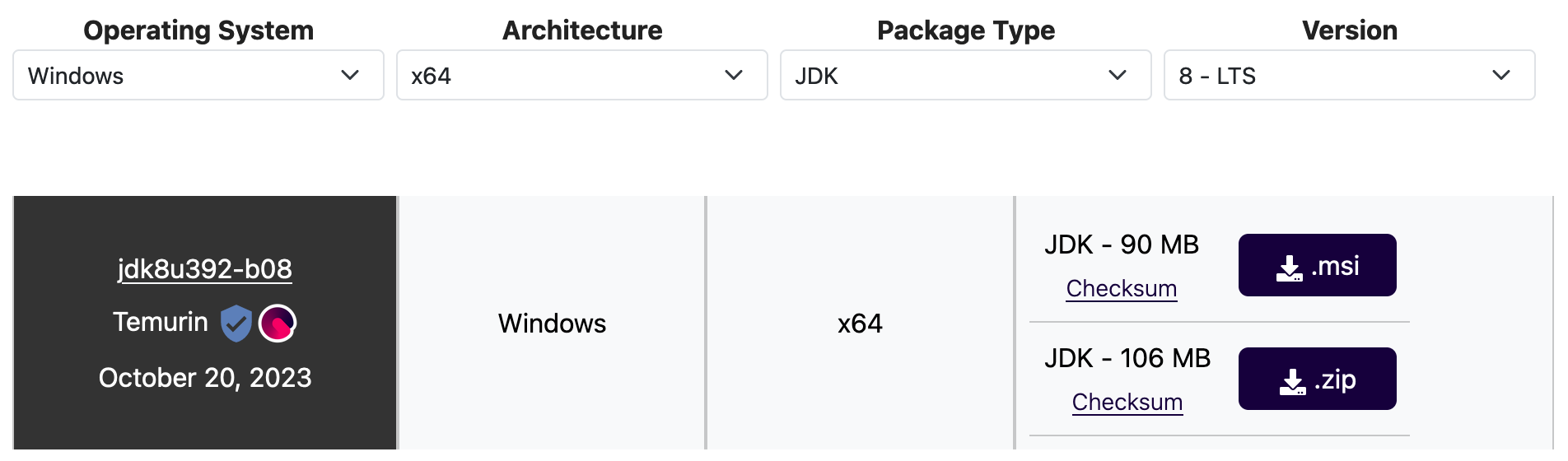
Select Windows as your Operating System and x64 as your architecture.
-
Select Package Type
JDK. -
Click on the available JDK msi file download link for the above selected options, to download the Temurin OpenJDK prebuilt binary.
-
Run the downloaded
msifile and follow the instructions of the installer. When prompted about the features to install, select the :Set JAVA_HOME variable (it is disabled by default) -
When the installation is over, to ensure that Java is now correctly installed, open a console and type
java -version. The output should look something like this:
If you are running Linux, it's recommended to install the OpenJDK 11 JDK supported to your Linux distribution.
Follow these steps in Ubuntu (other Linux versions may require a different install process):
-
Open a terminal and update your package index by running:
-
Install Java 11 by running:
-
Verify that java is available:
If you are running Linux, it's recommended to install the OpenJDK 11 JDK supported to your Linux distribution.
Follow these steps in Ubuntu (other Linux versions may require a different install process):
-
Open a terminal and update your package index by running:
-
Verify that java is available: