Configure the Marlin renderer
GeoServer WMS makes heavy use of Java's rendering facilities (the internal component is called a RenderingEngine). Java is a highly flexible environment allowing administrators to select an appropriate component for the workload being performed.
Correctly configuring the Marlin renderer is paramount to get the best performance. To do it, follow this step.
Reference:
Check Rendering Engine
First we need to check that Marlin is used by GeoServer:
-
Navigate to the About > Service Status page.
-
From the Status tab check the
Java Rendering Engineused:Java Rendering Engine Recommendation Java 8 sun.dc.DuctusRenderingEngineThis is the Java 8 default rendering engine, recommend installing Marlin. Java 8 org.marlin.pisces.MarlinRenderingEngineCorrectly configured with Marlin Rendering Engine Java 11 sun.java2d.marlin.DMarlinRenderingEngineJava 11 defaults to MarlinRenderingEngine -
From the Modules click on the Rendering Engine link.
-
Java 11 default
-
Java 8 default
-
Java 8 marlin
-
Install Marlin Rendering Engine: Windows
To install and configure Marlin, follow these steps:
-
Go to the marlin releases page:
-
Scroll down to the Latest release, and expand the release Assets to locate and download the latest marlin jar.
The jar contains the word "Unsafe" to indicate the use of internal Java API.
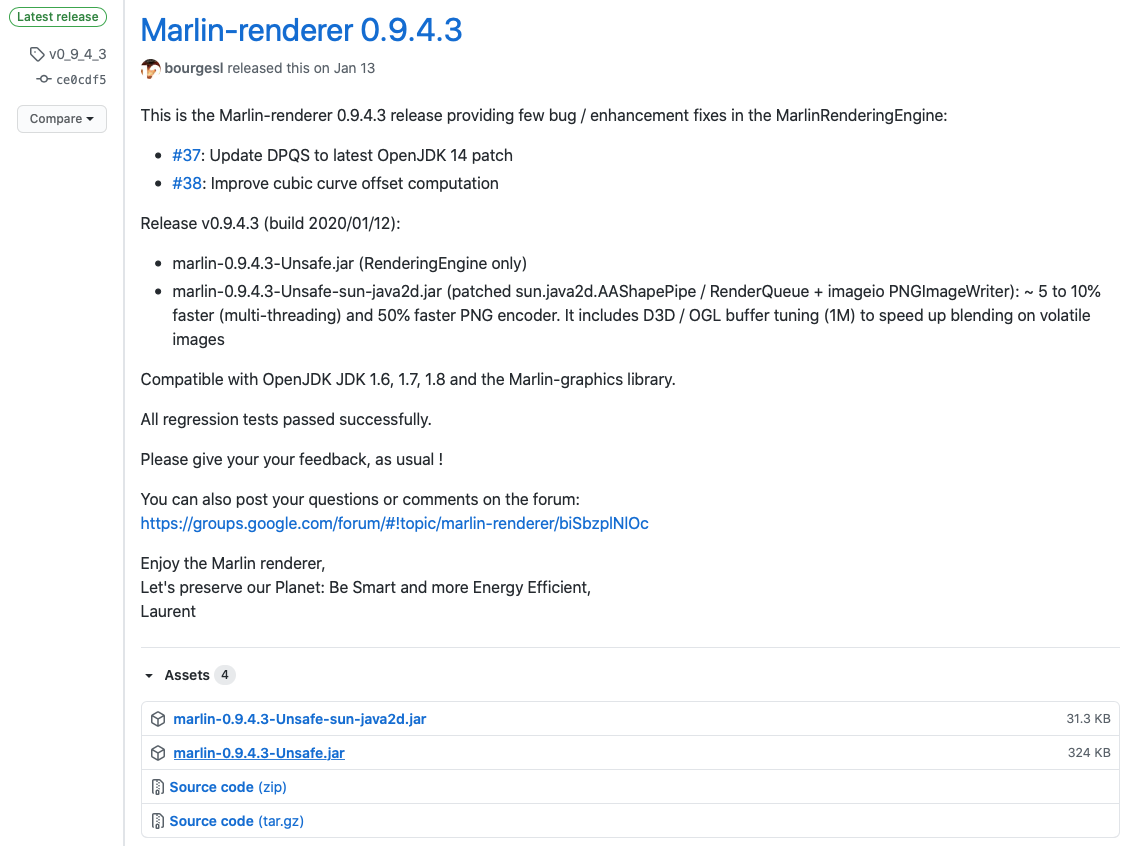 Download assets for Marlin-renderer
Marlin jar at the time of writing
marlin-0.9.4.3-Unsafe.jar. -
Copy the marlin jar file into Tomcat
libfolder.Double check file permissions to ensure that tomcat can read the jar.
-
Include jar in the boot classpath, and configure sun.java2d.renderer to use Marlin.
Java option:
-Dcatalina.home=C:\Program Files\Apache Software Foundation\Tomcat 11.0
-Dcatalina.base=C:\Program Files\Apache Software Foundation\Tomcat 11.0
-Djava.io.tmpdir=C:\Program Files\Apache Software Foundation\Tomcat 11.0\temp
-Djava.util.logging.manager=org.apache.juli.ClassLoaderLogManager
-Djava.util.logging.config.file=C:\Program Files\Apache Software Foundation\Tomcat 11.0\conf\logging.properties
-XX:SoftRefLRUPolicyMSPerMB=36000
-XX:-UsePerfData
-Xbootclasspath/a:lib/marlin-0.9.4.3-Unsafe.jar
-Dsun.java2d.renderer=org.marlin.pisces.MarlinRenderingEngine
System property:
-Dcatalina.home=C:\Program Files\Apache Software Foundation\Tomcat 11.0
-Dcatalina.base=C:\Program Files\Apache Software Foundation\Tomcat 11.0
-Djava.io.tmpdir=C:\Program Files\Apache Software Foundation\Tomcat 11.0\temp
-Djava.util.logging.manager=org.apache.juli.ClassLoaderLogManager
-Djava.util.logging.config.file=C:\Program Files\Apache Software Foundation\Tomcat 11.0\conf\logging.properties
-XX:SoftRefLRUPolicyMSPerMB=36000
-XX:-UsePerfData
-Xbootclasspath/a:lib/marlin-0.9.4.3-Unsafe.jar
-Dsun.java2d.renderer=org.marlin.pisces.MarlinRenderingEngine
Open the Tomcat configuration tool using Start > All Programs > Apache Tomcat > Tomcat Configuration. Click Configure and select the Java tab. Locate Java Options field, and add the following lines:
-Dcatalina.home=C:\Program Files\Apache Software Foundation\Tomcat 11.0
-Dcatalina.base=C:\Program Files\Apache Software Foundation\Tomcat 11.0
-Djava.io.tmpdir=C:\Program Files\Apache Software Foundation\Tomcat 11.0\temp
-Djava.util.logging.manager=org.apache.juli.ClassLoaderLogManager
-Djava.util.logging.config.file=C:\Program Files\Apache Software Foundation\Tomcat 11.0\conf\logging.properties
-XX:SoftRefLRUPolicyMSPerMB=36000
-XX:-UsePerfData
-Xbootclasspath/a:lib/marlin-0.9.4.3-Unsafe.jar
-Dsun.java2d.renderer=org.marlin.pisces.MarlinRenderingEngine
Note
-Xjava options are listed before-Dsystem properties. -
If your application server is currently running, stop it and restart it.
-
Navigate to the About > Service Status page.
-
From the Status tab check the
Java Rendering EngineTo confirm the
-Xbootclasspath/asetting include and was able to load the marlin jar. -
From the Modules click on the Rendering Engine link.
To confirm the
-Dsun.java2d.renderervalue has been recognized.
-
Install Marlin Rendering Engine: Linux
To install and configure Marlin, follow these steps:
-
Go to the marlin releases page:
-
Scroll down to the Latest release, and expand the release Assets to locate latest marlin jar.
The jar contains the word "Unsafe" to indicate the use of internal Java API.
-
Download into the tomcat
libfolder.cd lib wget https://github.com/bourgesl/marlin-renderer/releases/download/v0_9_4_3/marlin-0.9.4.3-Unsafe.jarMarlin jar at the time of writing
marlin-0.9.4.3-Unsafe.jar. -
Double check file permissions to ensure that tomcat can read the jar.
-
Include jar in the boot classpath, and configure sun.java2d.renderer to use Marlin. To do, add the following config line to your
Javaoptions.For Tomcat running as a service, edit the service configuration:
Change the
Environment="CATALINA_OPTS=line toEnvironment="CATALINA_OPTS=-Xms512M -Xmx10G -Xbootclasspath/a:/opt/tomcat/latest/lib/marlin-0.9.4.3-Unsafe.jar -server -XX:SoftRefLRUPolicyMSPerMB=36000 -XX:-UsePerfData -Dorg.geotools.referencing.forceXY=true -Dorg.geotoools.render.lite.scale.unitCompensation=true -Dsun.java2d.renderer=org.marlin.pisces.MarlinRenderingEngine"For Tomcat running from the command line, the required java option and system property in the
bin/setenv.shfile:#!/bin/sh # Prepend JVM Options CATALINA_OPTS="-XX:SoftRefLRUPolicyMSPerMB=36000 -XX:-UsePerfData ${CATALINA_OPTS}" # Append system properties CATALINA_OPTS="${CATALINA_OPTS} -Dorg.geotools.referencing.forceXY=true" # Java 8: Marlin CATALINA_OPTS="-Xbootclasspath/a=lib/marlin-0.9.4.9-Unsafe-OpenJDK17.jar ${CATALINA_OPTS} -Dsun.java2d.renderer=org.marlin.pisces.MarlinRenderingEngine"Note
-Xjava options must be listed before any-Dsystem properties. -
If your application server is currently running, stop it and restart it.
-
Navigate to the About > Service Status page.
-
From the Status tab check the
Java Rendering EngineTo confirm the
-Xbootclasspath/asetting include and was able to load the marlin jar. -
From the Modules click on the Rendering Engine link.
To confirm the
-Dsun.java2d.renderervalue has been recognized.
-
Troubleshooting
Changing java startup options can prevent tomcat from starting.
Trouble shooting recommendations:
-
Track the contents of the
logsdirectory during startup.Linux and macOS:
As an example
catalina.outwill report any unrecognized java options: